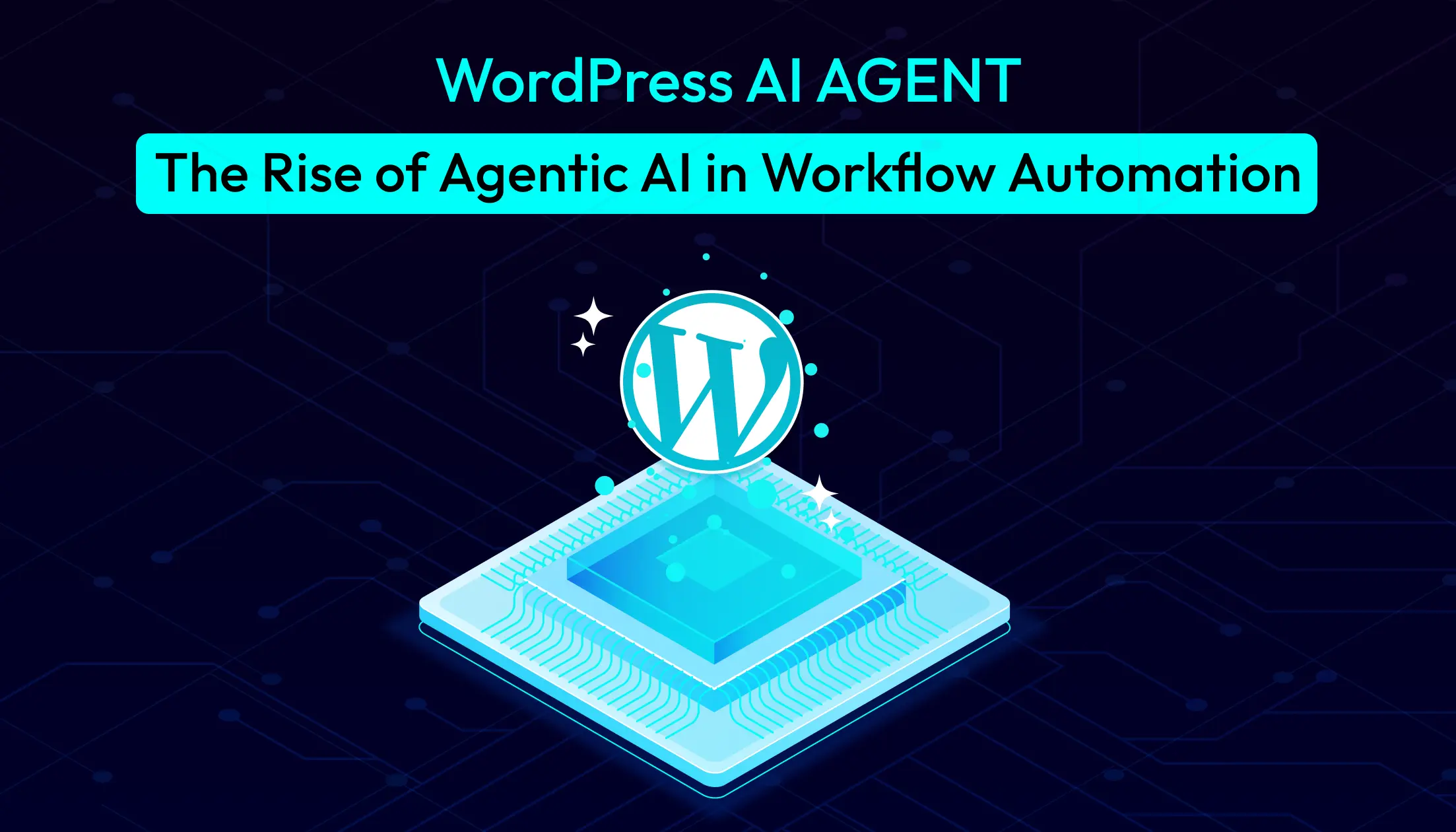
WordPress AI Agent: The Rise of Agentic AI in Workflow Automation


Most WordPress site owners spend their days playing catch-up. Every form submission needs a response. Every new product requires descriptions, blog posts, and updates across multiple platforms. Every customer interaction demands attention. The work never stops, and there’s only one of you.
Here’s what nobody tells you about running a WordPress site: the real challenge isn’t building it. It’s maintaining it. Feeding it. Keeping everything running while trying to scale.
What if your WordPress site could actually think? Not just follow pre-programmed rules, but understand context, make intelligent decisions, and handle complex tasks without constant supervision?
That’s exactly what AI agents bring to WordPress. And for the first time, you can build these intelligent systems right inside your WordPress dashboard without touching a single line of code.
Understanding AI Agents in WordPress
Let’s clear something up right away. An AI agent is not just another chatbot. It’s not a simple automation rule. And it’s definitely not just “WordPress with ChatGPT integration.”
Think about the difference between a vending machine and a store employee.
A vending machine follows exact rules: press B4, get chips, done. Traditional WordPress automation works the same way. When Form A submits, send Email B. It only does exactly what it was programmed to do, nothing more.
But a store employee thinks. If you ask for chips and they’re out of stock, they suggest something similar. If you seem confused, they ask what you’re looking for. If something unexpected happens, they figure it out.
That’s what an AI agent for WordPress does.
A WordPress AI agent combines three critical components: a large language model for intelligence, memory for context, and tools for taking action. The LLM provides reasoning and language understanding. Memory allows the agent to remember past interactions and build on previous decisions. Tools give it the ability to actually do things like updating posts, sending emails, creating products, or calling external APIs.
When you deploy an AI agent in WordPress, you’re not just automating tasks. You’re adding intelligence to your site. The agent interprets situations, evaluates options, and chooses appropriate actions based on your goals.
Why WordPress Needed AI Agents Beyond Traditional Automation
WordPress powers more than 43% of all websites on the internet. That’s hundreds of millions of sites. Yet until recently, site owners had only two options for automation: basic plugins with limited capabilities or expensive custom development.
The gap between what WordPress could do and what site owners needed was growing wider every year.
Consider the typical WordPress site owner. Maybe you run an online store. Maybe you publish content. Maybe you manage client sites. Regardless of your specific situation, you face the same fundamental problem: too much manual work.
Every contact form submission requires review and response. Every new blog post needs promotion across social channels. Every product added to your store demands descriptions, images, SEO optimization, and announcements. Customer support never sleeps. Content needs constant updating. Data flows between systems that don’t talk to each other.
Traditional automation helps, but only to a point. You can set up rules to automatically email someone when they submit a form. You can schedule posts. You can connect WordPress to other services through webhooks and APIs.
But these approaches hit a wall fast. What happens when a customer’s question doesn’t fit your pre-programmed responses? What if you need to make decisions based on context rather than simple if-then logic? How do you handle workflows that require interpretation and judgment?
The answer, until now, was to hire people or spend hours doing it yourself.
Here’s what makes the situation more urgent. AI agents solve this problem in a way that traditional automation never could. They understand natural language, so visitors can ask questions in their own words. They adapt to context, providing different responses based on user history, behavior, or intent. They handle complex multi-step processes that would require dozens of separate automation rules.
WordPress needed this technology. Site owners have been waiting for it. And now it’s finally here.
Introducing Bit Flows AI Agent for WordPress
Bit Flows has been a solid WordPress automation plugin for a while. It gave users a visual builder, native integration options, and more flexibility than basic automation tools. The addition of AI Agent capabilities transforms it into something far more powerful.
The AI Agent feature works as a special node in your workflow canvas. You drag it into your automation just like any other step. But unlike a simple action that executes a predefined task, the AI Agent thinks about what to do. You configure it with prompts that define its goal, add memory to give it context, and connect tools it can use to accomplish its mission.
Here’s what makes the Bit Flows AI agent different from everything else in the WordPress ecosystem.
- Complete Self-Hosting: Everything runs on your WordPress installation. Customer data, business information, and workflow logic stay on your server.
- Unlimited Everything: Bit Flows offers unlimited workflows and unlimited executions for a one-time payment. No monthly subscription fees. No per-task charges that spike during your busy season. Build as many AI-powered workflows as your site needs. Process millions of requests. The cost remains constant.
- True Agentic Capabilities: The AI agent in WordPress through Bit Flows isn’t just running prompts through ChatGPT. It maintains context through memory. It can call multiple tools in sequence. It makes decisions based on data analysis. It adapts its approach when circumstances change.
- Deep WordPress Integration: The Bit Flows AI agent works natively with WordPress core functions, WooCommerce, popular form plugins, membership systems, and virtually any WordPress feature you can think of. It’s not bolted on from the outside. It’s part of your WordPress environment.
- 250+ Integration Options: Beyond WordPress itself, the AI agent can interact with Google Sheets, email providers, Telegram, Slack, CRMs like HubSpot and Zoho, project management tools, and hundreds of other services. Your WordPress site becomes a central hub for intelligent automation across your entire business ecosystem.
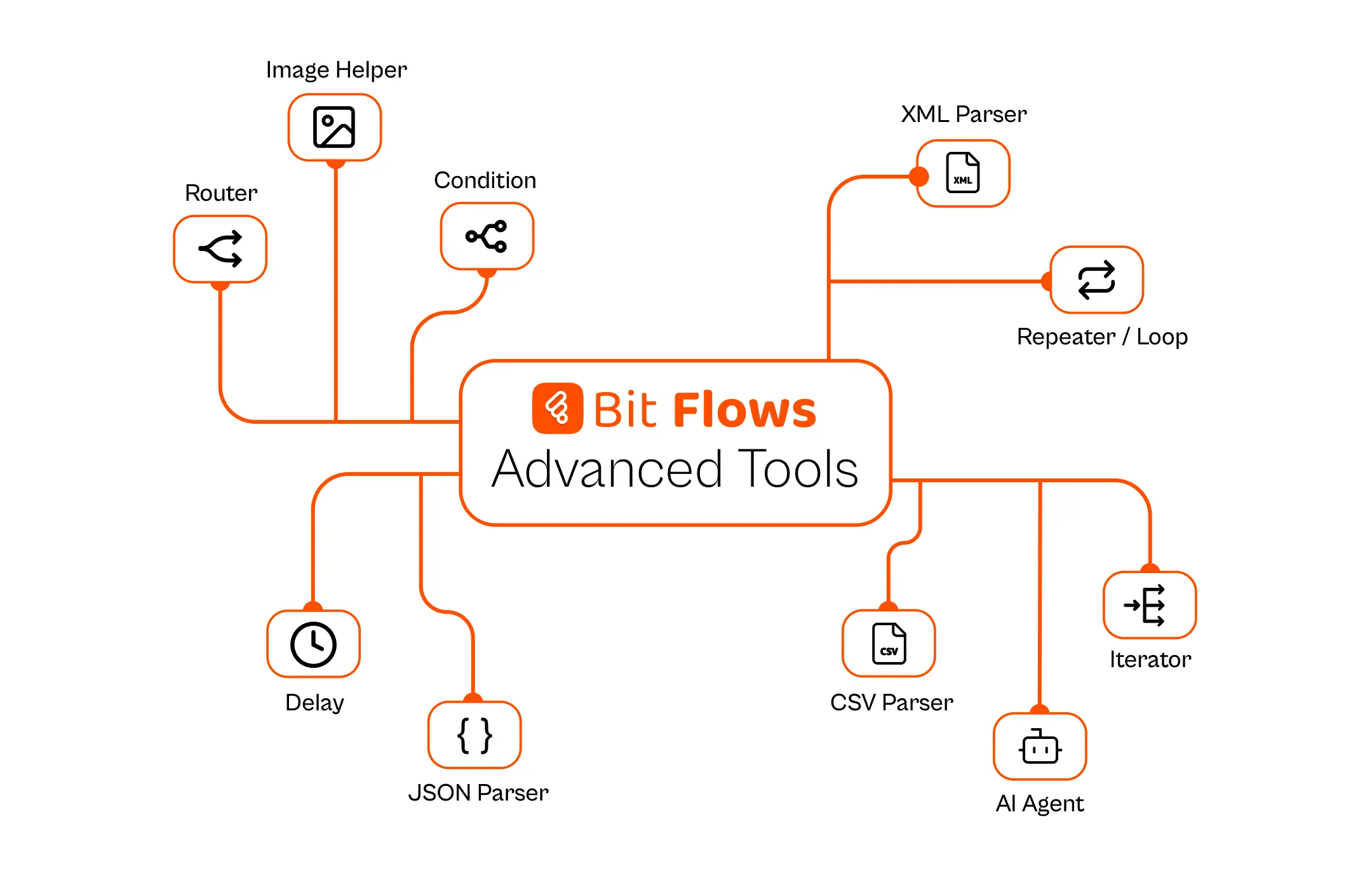
- Tools That Amplify Your AI Agent Capabilities: Bit Flows includes several advanced tools that enhance what your WordPress AI agent can accomplish. Understanding these features helps you build more sophisticated workflows.
How Bit Flows AI Agent Actually Works
Let’s get into the mechanics. Understanding how the AI Agent processes information and makes decisions helps you build better workflows.
Every agentic workflow starts with a trigger. Something on your site triggers the automation. This could be a user action (form submission, comment, or purchase), a scheduled event (daily at 9 AM), or an external signal (a webhook from another service). Bit Flows watches for these triggers continuously.
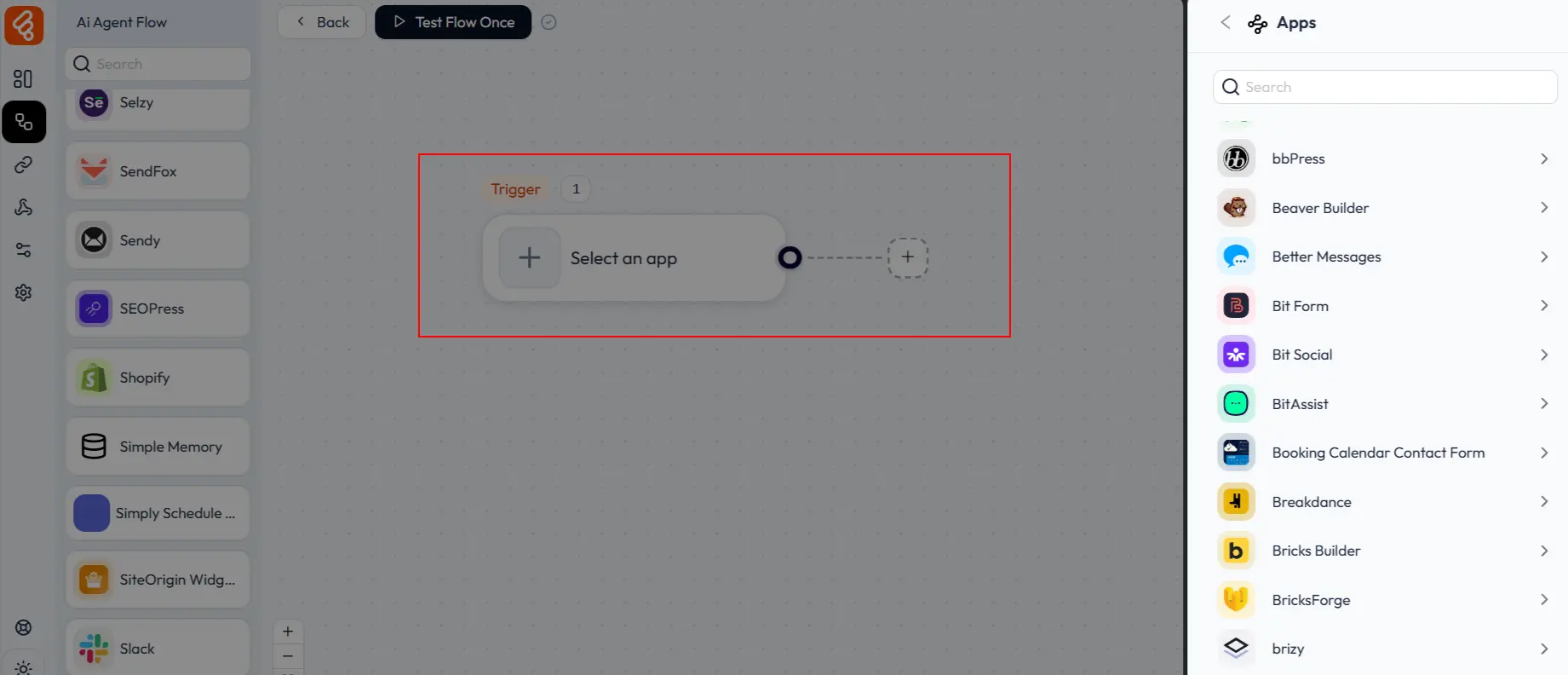
When a trigger fires, the workflow activates, and data flows to the AI Agent node. This is where the intelligence lives. You configure the agent with a system prompt that defines its role and objective. For example, “You are a customer support specialist. Analyze incoming messages and determine the best response strategy.”
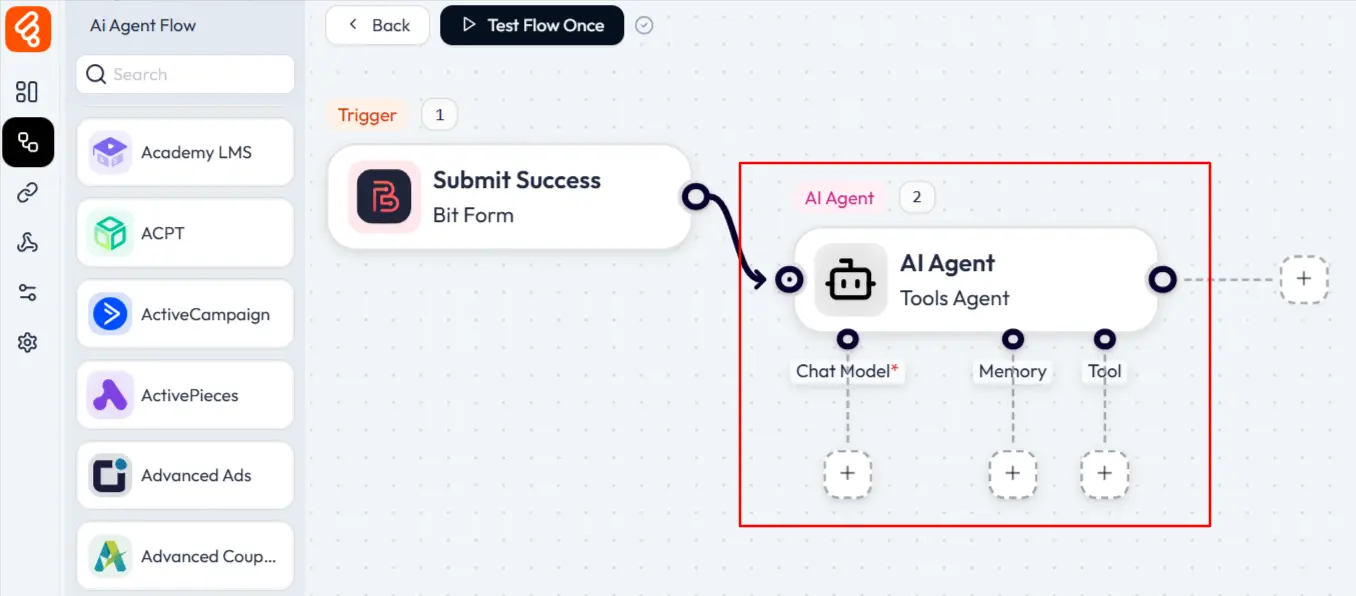
The agent uses a chat model to process the input. It reads the trigger data (form fields, order details, whatever was provided), considers the prompt you gave it, and reasons about what to do. This isn’t keyword matching or simple classification. The LLM understands nuance, context, and intent.
Memory becomes crucial for multi-step reasoning. The agent can store variables from previous steps and reference them later.
Tool calling is where decisions become actions. After reasoning about the situation, the agent decides which tools to use. These tools are actually Bit Flows actions like sending emails, creating posts, updating databases, or calling APIs. The agent doesn’t just pick tools randomly. It chooses based on what will accomplish the goal.
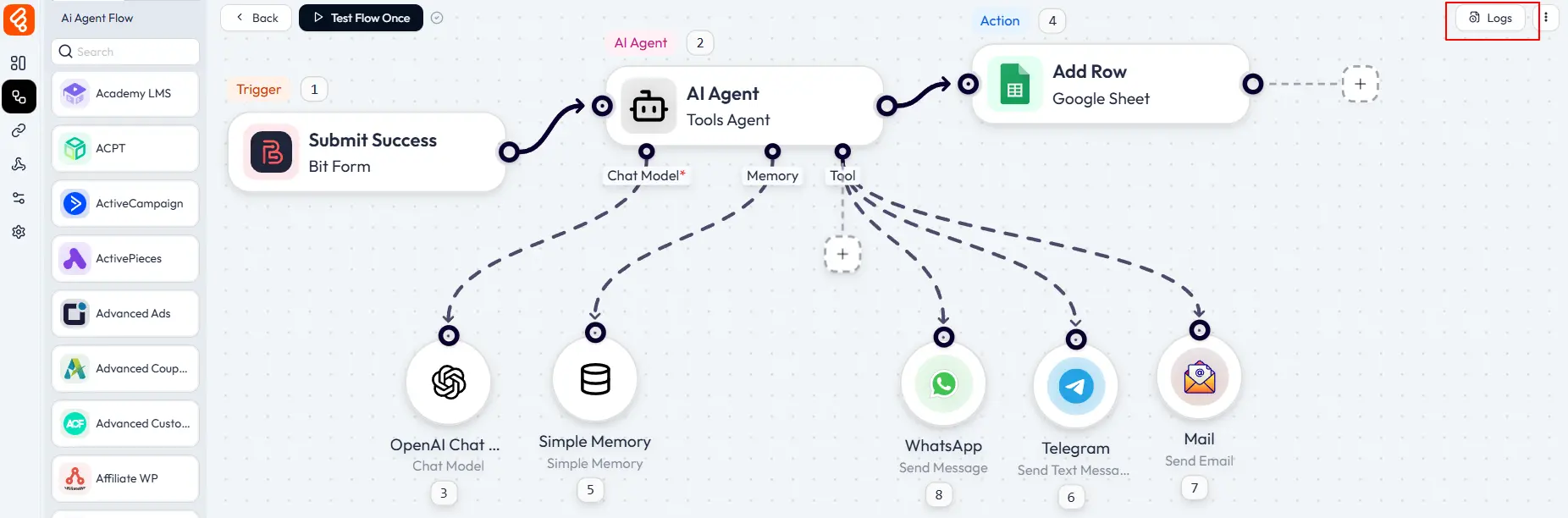
You can monitor everything through detailed logs that show each step’s input, output, and any decisions made.
The entire process happens asynchronously in the background. Your site’s performance stays smooth. Visitors experience no delays. The automation churns away behind the scenes, processing tasks as they arrive.
And if an action fails, you’ll get email notifications about failures so you can intervene if needed. The system is robust enough for production use where reliability matters.
Real WordPress Workflow Examples Transformed by AI Agents
Theory is interesting. Real examples are convincing. Let’s look at some actual workflows that demonstrate what AI agents for WordPress can accomplish.
Workflow 1: Product Creation from External Data
Many WordPress site owners maintain product information in Google Sheets before adding items to their site. Pricing data, supplier information, and inventory levels all live in spreadsheets because they’re easy to update and share with team members.
The traditional approach means manually transferring this data into WordPress. It’s time-consuming and error-prone. A single typo can create problems.
An AI agent in WordPress transforms this completely.
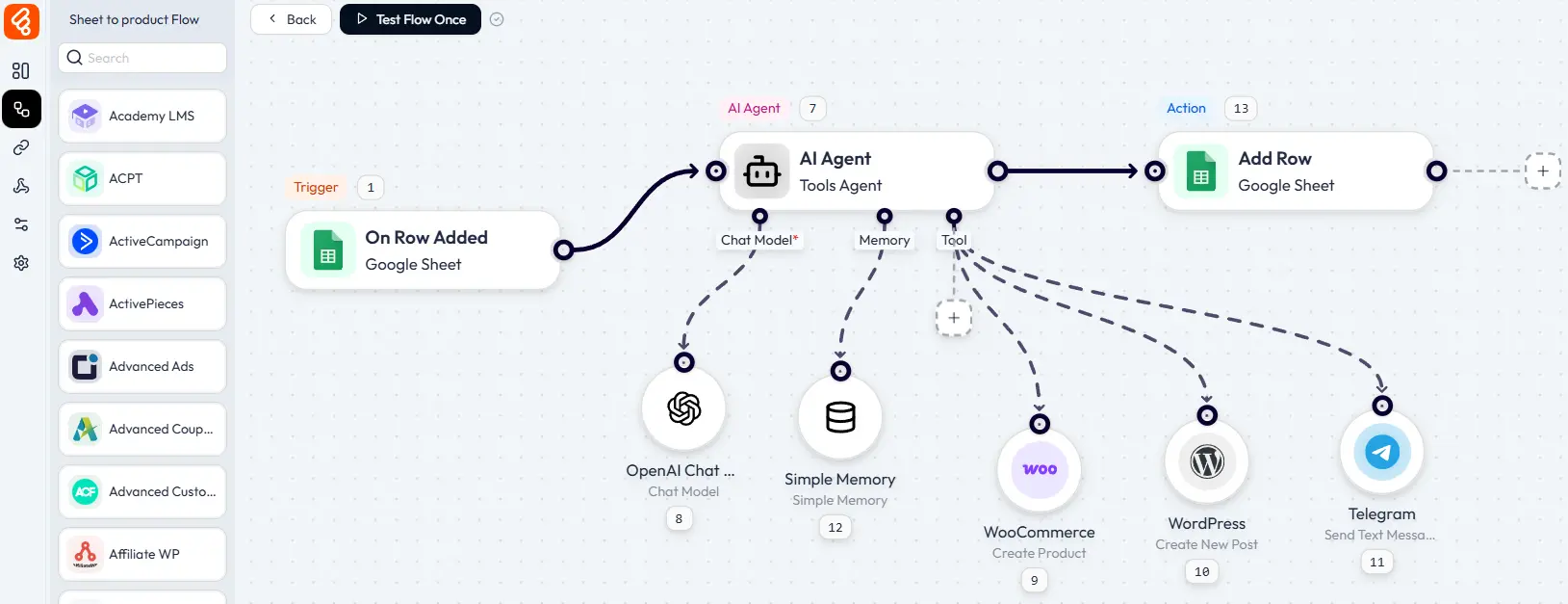
Trigger: Google Sheets (New Row Added)
When you add a row to your product spreadsheet with basic details like product name and price, the workflow starts.
AI Agent Processing:
The agent receives the spreadsheet data and enriches it using artificial intelligence. Your prompt instructs it:
“Using this product name and price, create a complete WordPress product listing. Generate a compelling product description that highlights value and benefits. Create relevant tags and categories. Write a short description suitable for product cards and search results. Make all content engaging and optimized for conversions. Then create a product using the WooCommerce(Create Product) tool, publish a post using the WordPress (Create Post) tool, and send a post publish notification via telegram”
The agent processes this request using its configured chat model (OpenAI, Groq, DeepSeek, or others). It generates both pieces of content based on your instructions.
Tools Available:
- WooCommerce (Create Product): Adds the product with AI-generated content
- WordPress (Create Post): Publishes an announcement
- Telegram (Send Message): Notifies your team
Final Action:
The workflow updates your Google Sheet with the WordPress product ID and publication status, maintaining synchronization between systems.
What used to require 15-20 minutes per product now happens automatically. You keep your spreadsheet workflow while the AI agent handles content creation and WordPress integration.
Workflow 2: AI-Driven Customer Support That Actually Helps
Support tickets drain time and energy. Customers need quick responses. But each message requires reading, understanding, researching, and crafting appropriate replies. The workload never ends.
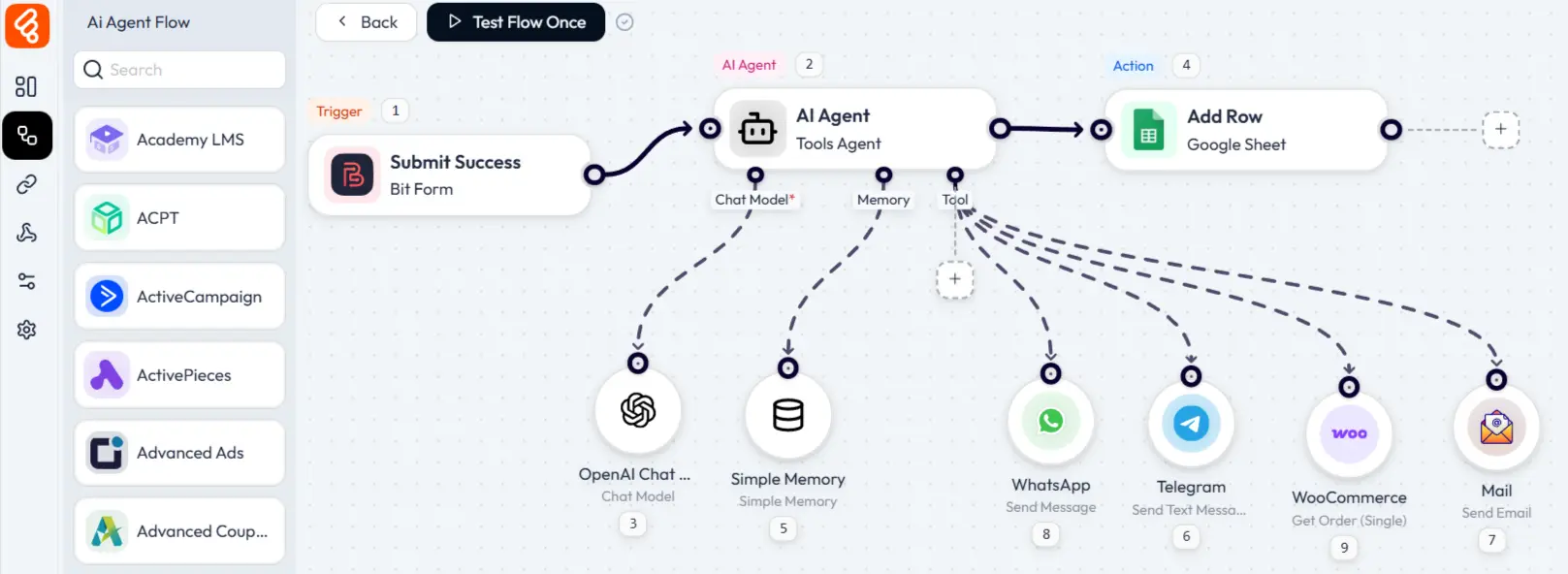
An AI agent changes this completely. When a customer submits a support form, the agent reads the message and determines intent. Are they asking about shipping? Requesting a refund? Reporting a bug? The agent categorizes automatically.
Next, it checks relevant information. For shipping questions, it pulls order status from WooCommerce. For product questions, it references your documentation. For account issues, it looks up the user history.
The agent then generates a personalized response. Not a generic template. A message tailored to this specific customer and situation. It might include their order number, estimated delivery date, and a direct answer to their question.
If the issue requires human attention, the agent routes it to the right team member with full context attached.
Workflow 3: AI-Driven E-commerce Intelligence
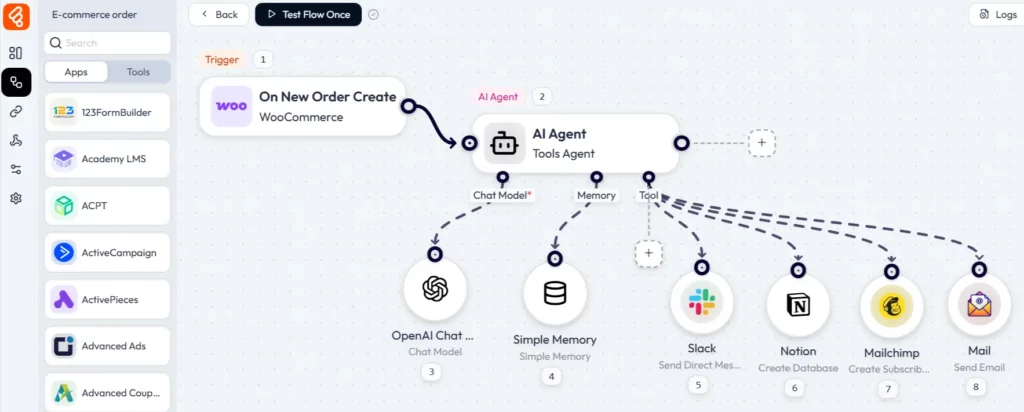
WooCommerce stores generate constant data. Orders, customers, inventory, reviews. Managing it all manually means opportunities slip through. AI agents turn data into action.
When high-value orders come through, the agent can tag those customers as VIP in your CRM, send a personal thank-you message, and flag their accounts for priority support. All automatically, the moment the order processes.
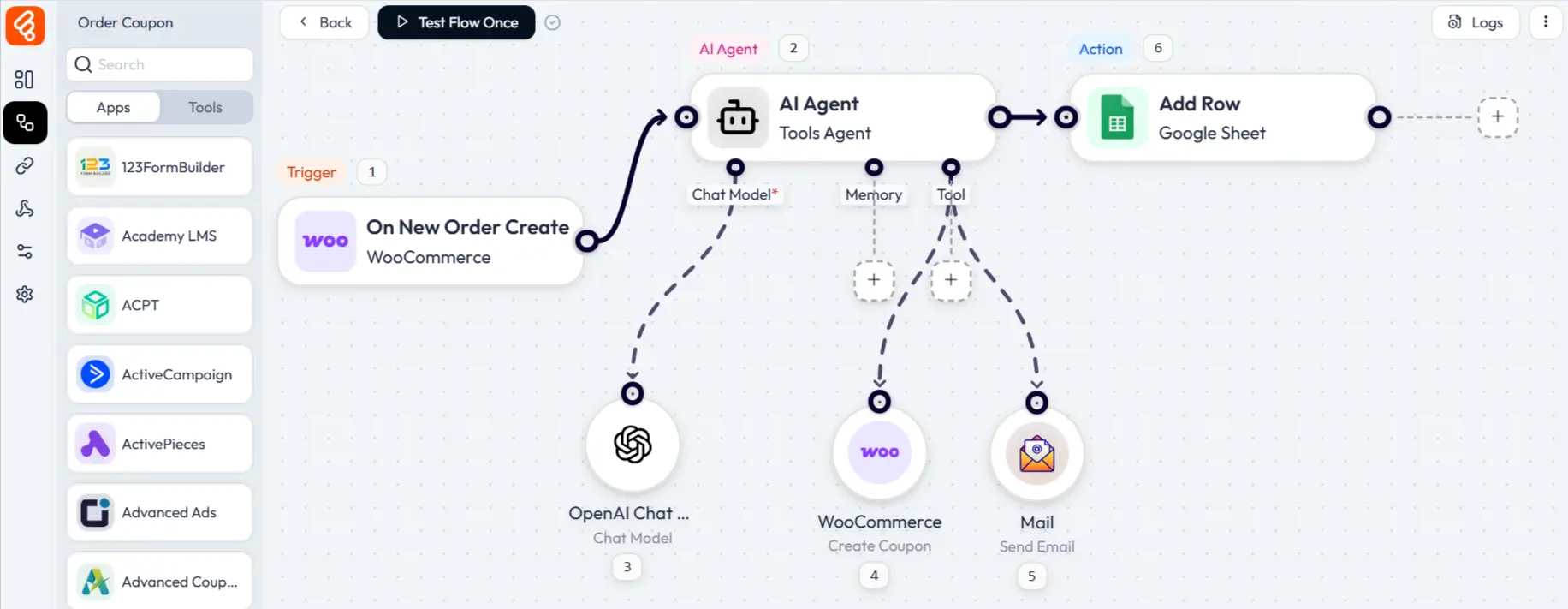
You can also create a coupon based on the order total. Then update the coupon on the WooCommerce Coupon list and send a personalized email with the coupon code to the customer.
Implementation Strategies That Actually Work
Building effective AI agent workflows requires more than connecting tools and writing prompts. Follow these strategies to maximize results.
Begin with Single-Purpose Workflows
Don’t try to automate everything at once. Start with one well-defined workflow. Get it working correctly. Learn how your AI agent responds to different scenarios. Then expand.
Write Precise, Detailed Prompts
Your AI agent’s effectiveness depends heavily on your instructions. Vague prompts produce inconsistent results. Be explicit about decision criteria. If the agent should behave differently based on user type, purchase history, or message content, state those rules clearly.
Monitor Continuously
AI agents improve with refinement. Monitor your workflows regularly, especially during the first month. Look for patterns in execution logs. Are certain inquiry types being mishandled? Does the agent consistently make specific mistakes?
Adjust your prompts based on actual performance. Small changes often produce significant improvements in quality and accuracy.
Performance and Privacy Matter
Running AI Agents on your WordPress site raises valid questions about performance, security, and reliability. Let’s address these concerns directly.
Performance impact is negligible for visitors. Bit Flows processes workflows asynchronously in the background. When a trigger fires, the request goes into a queue. Your page loads normally while the workflow executes separately. Visitors never wait for AI processing. Even complex multi-step agentic workflows don’t slow your site’s front end.
Data privacy is better with Bit Flows compared to external automation platforms. Your sensitive information stays on your WordPress database. The only external connection is to AI model APIs, and you control which data gets sent. You can anonymize or redact sensitive fields before they reach the AI. Nothing passes through third-party automation platforms.
The Real Cost of AI Agents in WordPress Automation
Most automation platforms charge you per task, meaning the more workflows you run, the more you pay. Run 1,000 workflows a month, pay for 1,000 tasks. Scale up, costs scale proportionally. This model makes growth expensive.
Bit Flows offers a better deal. The core plugin is free to download from the WordPress plugin directory. You can install it on unlimited sites, create endless workflows, and run as many tasks as you need. No surprise charges. No task caps.
The only cost you’ll encounter are API fees from AI providers like OpenAI, Google, and Anthropic, which are based on the tokens processed. Running a typical workflow costs only a fraction of a cent, and even heavy users pay just a few dollars a month.
For premium features and integrations, Bit Flows has a one-time Pro version with lifetime access. No recurring payments.
The Future of AI Agents in WordPress
Sites that can think, decide, and act autonomously will outperform those requiring constant human intervention. The technology is mature. The tools are accessible. The only question is whether you’ll implement AI agents now or watch as others gain the advantage.
Bit Flows brings AI agent capabilities to every WordPress site owner, regardless of technical expertise or budget. No recurring fees are eating into your revenue. No per-task charges that grow as you scale. Just powerful automation that works continuously.
Start with one workflow. Watch it perform. Then expand. Before long, you’ll discover your WordPress site handling tasks that used to consume hours of your time every day.
The rise of agentic AI in WordPress is happening now. Your site can be part of this transformation starting today.
Frequently Asked Questions (FAQs)
What are AI agents in WordPress?
AI agents are intelligent automation tools that make decisions, process data, and take actions based on context, all within your WordPress site.
What makes Bit Flows AI Agent different from other AI automation tools?
Bit Flows AI Agent runs entirely within your WordPress site, keeping your data private, speeding up execution, and eliminating per-task fees. The AI agent integrates directly with WordPress, WooCommerce, and popular plugins for deeper functionality than external tools.
What are the key features of the Bit Flows AI agent?
Bit Flows AI agent includes memory, intelligent decision-making, and the ability to call multiple tools in sequence.
How do I know the AI agent made the right decision?
Bit Flows provides detailed execution logs for every workflow run. You can see exactly what data the agent received, how it analyzed that data, what conclusions it reached, and what actions it triggered. This transparency lets you verify decisions and refine prompts if needed.
What happens if an AI agent workflow fails?
Bit Flows sends email notifications whenever workflow steps fail. You receive immediate alerts rather than discovering problems days later. The execution logs show exactly what went wrong, and you can also re-execute failed workflows directly from the logs once you fix the issue.
Do I need to pay for ChatGPT or other AI models?
To use AI models like OpenAI, Gemini, or Deepseek, you’ll need to add your own API key. Any AI usage cost depends on your provider and how often your workflows run.
Do I need coding skills to use AI agents in WordPress?
No, Bit Flows is a no-code solution, making it easy to set up AI agents without any technical knowledge.
Subscribe to Our Newsletter
Get the latest WordPress tutorials, trends, and resources right in your inbox. No Spamming, Unsubscribe Anytime.

Thank you for subscribing to our newsletter!

Table of Content
- Understanding AI Agents in WordPress
- Why WordPress Needed AI Agents Beyond Traditional Automation
- Introducing Bit Flows AI Agent for WordPress
- How Bit Flows AI Agent Actually Works
- Real WordPress Workflow Examples Transformed by AI Agents
- Workflow 1: Product Creation from External Data
- Workflow 2: AI-Driven Customer Support That Actually Helps
- Workflow 3: AI-Driven E-commerce Intelligence
- Implementation Strategies That Actually Work
- Performance and Privacy Matter
- The Real Cost of AI Agents in WordPress Automation
- The Future of AI Agents in WordPress
- Frequently Asked Questions (FAQs)